Smart Lock Card
Monitor and control smart locks, whatever the integration.
State, door, battery, lock, unlock and open at a glance, for any lock entity: Nuki, Tedee, Yale, Aqara, SwitchBot, Matter, Z-Wave, Zigbee… A drawn lock follows the model and animates with the state.
Highlights
- Works with every lock integration
- Drawn lock picture matching the model, animated while it moves
- Lock, Unlock and Open with a confirmation popup
- Door sensor, battery, keypad and activity
- Warning when the door is open while unlocked
- Warning when the lock stays unlocked longer than you set
- Compact mini card
- Auto-lock countdown while unlocked
Cards
type: custom:smartlock-cardInstall
- 1Open the repository in the Marketplace with the Add to Marketplace button above, or add
github.com/juju35/ha-smartlock-cardas a custom repository (category Dashboard). - 2Download it from the Marketplace.
- 3Reload the browser and add the card from the dashboard editor.
Gallery 17
Documentation
From the README Features
Features
- Two cards: a full Smart Lock Card and a compact Smart Lock Mini Card
- Works with every lock integration of Home Assistant (the standard
lockentity) - Drawn lock picture that follows the model: retrofit, rotary knob, compact cylinder, keypad deadbolt, fingerprint lever, access reader or padlock, in white, black or steel; or a picture of your own
- The picture follows the state: locked, unlocked, open, jammed, animated while locking, unlocking or opening
- Lock, Unlock and Open buttons; Open (pull the latch) only for locks that support it
- Confirmation popup at the top of the card before unlocking and opening (configurable, also for locking)
- Code entry when the lock asks for one (
code_format), checked against the lock's format; the code is never stored - Automatic discovery of the entities of the lock device: door sensor, battery (percentage or "battery low"), charging, keypad battery, problem sensor
- Door open / closed, jammed lock and problem alerts, a warning when the door is open while the lock is unlocked, and an optional warning when the lock stays unlocked too long (
unlocked_alert) - Auto-lock countdown: Locks again in 2:40 while unlocked, from the device's auto-lock delay or
auto_lock_delay - Last change ("Locked 5 minutes ago · by Keypad" when the integration reports who)
- Details: the other sensors of the lock (signal strength, firmware…)
- Settings: switches toggle in place (auto-lock, night mode…), buttons ask before being pressed, selects and numbers open their dialog
- Activity: the last lock / unlock / open events of the logbook (7 days), with the automation or Home Assistant as the source
- Collapsible sections (settings and activity folded by default)
- Detail button on the mini card (top right): it switches the mini card to the full card's content and back; a click anywhere outside the card brings the compact view back
- Click any value to open its Home Assistant history (more-info dialog)
- Visual editor in the dashboard UI for both cards (no YAML needed); options that would have no effect (picture options without the picture, Open and confirmations without the buttons) are hidden
- Keyboard: every part that opens a dialog or acts can be reached with Tab and activated with Enter / Space
- Light and dark mode, English, French, German, Spanish, Serbian (Cyrillic and Latin), Italian, Dutch, European Portuguese, Polish, Romanian, Danish, Swedish, Bulgarian, Russian, Ukrainian, Hungarian, Slovak, Czech, Slovenian, Latvian and Greek
- Single file, no external dependency
Supported integrations
Supported integrations
The cards work with every lock integration (the standard lock entity): Nuki, Tedee, Yale, August, Schlage, SwitchBot, Aqara, Ultraloq, LOQED, igloohome, Sesame, UniFi Access, Matter, Z-Wave, Zigbee (ZHA, Zigbee2MQTT), HomeKit, template locks…
| Feature | Integrations |
|---|---|
| State, lock, unlock, code | Every lock integration |
| Open (pull the latch) | Locks with the Open feature (Nuki, Tedee, Matter…) |
| Who changed it | Integrations that report changed_by |
| Door sensor, battery, keypad | Discovered on the lock's device; the keypad also by Nuki's translation key |
Prerequisites
Prerequisites
A lock integration with at least one lock.* entity, with Home Assistant 2024.8 or later.
Configuration
Configuration
Visual editor#
Edit a dashboard, click Add card and search for Smart Lock Card or Smart Lock Mini Card. The first lock is preselected; pick another one if you have several, set an optional title, choose the buttons, the confirmations, the sections to display and the language. The preview updates live, and options left at their default are kept out of the generated YAML.
Minimal#
type: custom:smartlock-card
type: custom:smartlock-mini-card
Full options#
type: custom:smartlock-card
entity: lock.front_door
title: Front door
image: auto
finish: white
show_icon: true
show_picture: true
show_controls: true
show_open: true
show_details: true
show_settings: true
show_activity: true
confirm:
  - unlock
  - open
collapsed:
  - settings
  - activity
door_entity: binary_sensor.front_door_contact
battery_entity: sensor.front_door_battery
language: fr
type: custom:smartlock-mini-card
entity: lock.garage
title: Garage
image: knob
show_icon: true
show_picture: true
show_controls: true
show_open: true
confirm:
  - unlock
  - open
zoom: true
language: fr
Options reference#
| Option | Card | Default | Description |
|---|---|---|---|
entity |
both | First lock | Lock entity (lock.*) |
title |
both | Lock name | Card title |
show_title |
both | true |
Show the title in the header (e.g. false under a section heading of your own) |
show_subtitle |
both | true |
Show the subtitle under the title |
image |
both | auto |
Lock picture: auto (per model), retrofit, knob, compact, keypad, lever, reader, padlock, none, or the URL of your own picture (e.g. /local/my-lock.png) |
finish |
both | Per model | Finish of the drawn picture: white, black or steel |
show_icon |
both | true |
40 px state icon at the left of the header, on the full card and on the mini card (compact and zoomed in). On the compact mini card it takes the place of the picture below 300 px, and leaves its room to the state at 6 columns of a phone |
show_picture |
both | true |
Lock picture (same as image: none when false) |
show_controls |
both | true |
Lock / Unlock buttons (a single toggle button on the mini card) |
show_open |
both | true |
Open button, for locks that can pull the latch (Nuki, Tedee, Matter…). On a narrow mini card (6 columns), it moves behind the detail button so that the state stays readable; without the detail button (zoom: false) it stays on the card |
confirm |
both | [unlock, open] |
Actions that ask for confirmation, among lock, unlock and open ([] to never ask). A lock that needs a code always asks for it |
code |
both | — | Code sent with every action, for locks that need one and when you don't want to type it. It is stored in the dashboard configuration in clear text: prefer typing it |
unlocked_alert |
both | — | Minutes: once the lock has stayed unlocked (or open) longer than that, the full card shows a warning line and the mini card shows its detail in the warning color. Counted from the lock's last change (last_changed), which Home Assistant resets when it restarts: after a restart the delay starts again from then |
auto_lock_delay |
both | from the device | Seconds: while the lock is unlocked, show Locks again in m:ss until it should lock itself. Without it, the card reads the auto-lock delay of the lock's device (a number entity in s or min) and its auto-lock switch, when it has them |
door_entity |
both | Found on the lock device | Door sensor (binary_sensor), when it belongs to another device (a contact sensor on the door) |
battery_entity |
both | Found on the lock device | Battery: a percentage sensor, or a "battery low" binary_sensor |
zoom |
mini | true |
Detail button at the top right of the mini card: it shows the full card's content (with the same options, so show_settings, collapsed… can be set on the mini card too) and switches back to the compact view; a click outside the card also brings the compact view back. false removes the button |
show_details |
full | true |
Other sensors of the lock device (keypad battery, signal strength…) |
show_settings |
full | true |
Switches, selects, numbers and buttons of the lock device |
show_activity |
full | true |
Last events of the lock in the logbook |
collapsed |
full | [settings, activity] |
Sections folded by default, among details, settings and activity ([] to unfold everything). Click a section title to fold or unfold it |
language |
both | Auto | Force language: en, fr, de, es, sr (Serbian Cyrillic), sr-Latn (Serbian Latin), it, nl, pt (European Portuguese, also used for Brazilian Portuguese), pl, ro, da, sv, bg, ru, uk, hu, sk, cs, sl, lv or el (auto-detects from HA settings) |
How it works
How it works
The cards use the standard lock entity, so every lock integration works: the state (locked, unlocked, open, locking, unlocking, opening, jammed), the lock.lock, lock.unlock and lock.open actions, the Open feature (supported_features), the code_format and changed_by attributes.
The other entities of the lock are found through the entity and device registries: everything on the same device as the lock, matched by its domain and device class (door / opening / garage_door for the door, battery, battery_charging, problem). Entity ids can therefore be in any language or renamed without breaking the cards. The keypad is the exception: it is found by its name (keypad, clavier, Tastatur, teclado, tastierino, toetsenbord, klawiatura, tastatura, knappsats, klaviatura, billentyuzet, klavesnica / klavesnice, tipkovnica or pliktrologio in the entity id) or by the integration's translation key (Nuki), so a keypad entity renamed to something else shows under Details. When the door sensor or the battery belongs to another device, set door_entity or battery_entity.
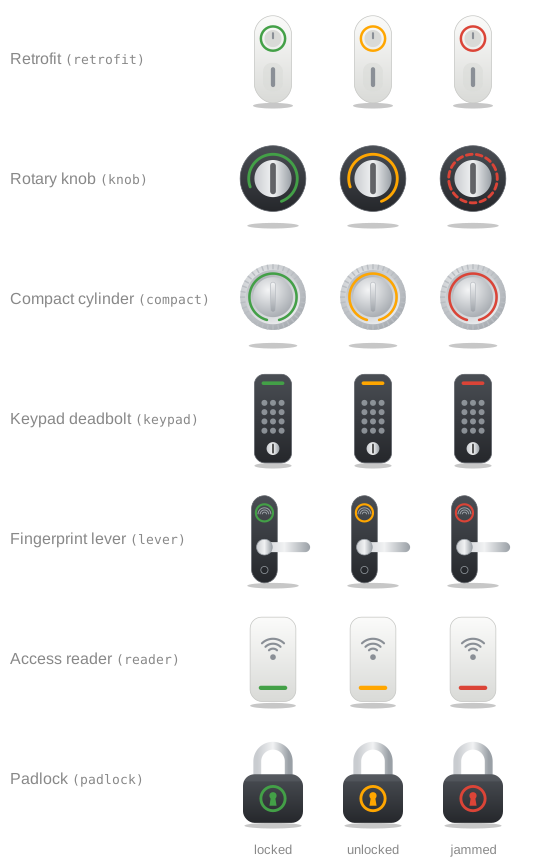
The picture is drawn for the family of the lock, picked from its integration, manufacturer, model and name: retrofit case (Nuki Smart Lock 3/4/5, SwitchBot Lock), rotary knob (Tedee Pro, Yale Linus, Sesame, Aqara U100/U200, August), compact cylinder (Nuki Smart Lock Ultra, Tedee GO), keypad deadbolt (Yale Assure, Schlage, Kwikset, Ultraloq U-Bolt), fingerprint lever (Ultraloq Latch, Aqara D100/A100, LOQED), access reader (UniFi Access, ekey, KIWI) and padlock for anything else. These are generic drawings of each kind of lock, not pictures of the products. Use image and finish to pick another one, or your own picture.
The picture follows the lock state: the thumb turn or knob turns (the lever dips, the shackle lifts) when unlocked, moves while locking or unlocking, waves while opening, shakes when jammed, and the light takes the state color. It stays still with the reduced-motion setting.
After a button press, the card shows the requested state (Locking…, Unlocking…, Opening…) until the lock reports a new one (20 s at most); if the call fails (wrong code, lock offline), the real state is shown again and Home Assistant reports the error.
The activity section reads the logbook (logbook/get_events) when it is unfolded, and again when the lock changes. The source of each event is the automation or script that triggered it, or "from Home Assistant" for an action from the interface.
Support
Support
If you find this project useful, you can support its development:

Changelog
All 30 versions 1.10.0Nov 12, 2026Latest
Features
show_titleandshow_subtitleoptions (also in the visual editor) hide the header's title and its subtitle, separately, for a card placed under a section heading of its own (asked in juju35/ha-vehicle-card#72).
1.9.1Nov 9, 2026
Maintenance
- No code change: released again to check the installation from the Marketplace.
1.9.0Nov 9, 2026
Features
- Auto-lock countdown: while the lock is unlocked, both cards show Locks again in m:ss (full card: a line under the door; mini card: the sub-line detail), ticking every second. The delay comes from
auto_lock_delay(seconds, new editor field) or from the device's auto-lock delay entity (numberin s or min), and the countdown only shows while the device's auto-lock switch, when it has one, is on. Nothing counts once the delay is past.
1.8.1Nov 9, 2026
Fixes
- Translations: the cards are defined once the page's language file has arrived (at most 1.5 s; Home Assistant builds a card when its element gets defined), so the first render is already translated instead of English then redrawn; until a language file is in, a missing text reads the English one wherever the card has no fallback of its own.
1.8.0Nov 9, 2026
Performance
- Translations load on demand: the bundle keeps English only (150 KB → 91 KB) and each other language is its own
smartlock-card.i18n.<lang>.jsfile next to it, fetched the first time a card needs it. Home Assistant loads every dashboard resource on every dashboard, so each page used to download and parse all 22 languages to use one. Until a language file has arrived (a few milliseconds), texts fall back to English, and the cards redraw once it is there.
Maintenance
- Build:
scripts/i18n-split.mjssplits the built bundle and rebuilds every table from the split files to check them (the build fails on any difference);src/keeps every language as before. - Release: every file of
dist/is attached. Manual installation copies the translation files too.
1.7.1Nov 8, 2026
2026-11-08
Fixes
- Mini card: the warnings (door open while unlocked, unlocked for too long) are also given in words to screen readers, not by color only.
- Mini card: the 40 px state badge stays on narrow cards (6 columns of a phone); it shares the name's line so that the state word keeps the width of the card.
Documentation
- README:
unlocked_alertcounts from the lock's last change, which Home Assistant resets on restart.